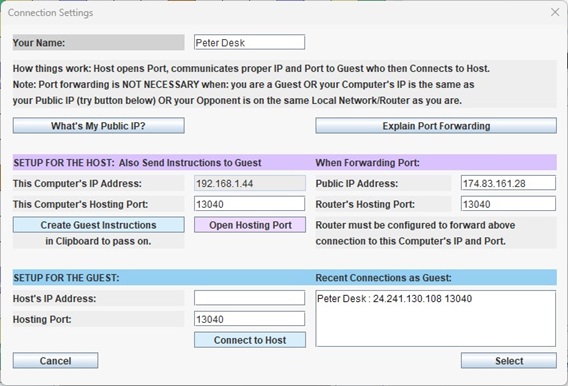
 I
want to start with the most complicated case -- two players each on
their own home or local network. One of them needs to do this. Later, we can deal with the easy
situations which are also mentioned in the adjacent Connection Box. A local
network is like a gated community. The gate is located at a given
address (i.e., IP) on World Wide Boulevard. Inside the gate is Machines
Street which winds through the entire population. Every machine has its
own address which is unique within the community. Thousands could have
that same local address but in other communities.
If you wanted to connect
with someone in a given community, a double-address approach would
work. You would provide the World Wide address to get to the gate as
well as the local Machines Street address to get to the computer in
question. That would be conceptually simple to understand and require
only a few more keystrokes. But a protocol to do that does not
exist.
Computer connections
happen via an address and a port number (which is in essence one of
many doors to the machine). This is a second piece of information that
can be used for other purposes. The technique I will describe is called
Port Forwarding but that name is somewhat misleading. The port number
used in the initial request to the World Wide address is used like a
secret code number for a garage door opener.
Every
member of the community has their own unique secret code. They may all
end up using the same port so it is clearly not intended to be a
useable port number for a connection. The gatekeeper for the community
(your router) has a list of these codes. For each code it knows the
corresponding local address and the port number that should be used to
make the connection.
Example from such a
list: Main Gate Caller Port Used: 1099
Transfer To Address: 198.164.1.44 Using Port: 13040
This
is pretty understandable. The problem with it is that you have to tell
your router this information. Most people have likely never told their
router anything more than the name to use for the network. But
there is always a first time for everything, and hosting games with
friends and family members might make you a hero.
To get to the router's interface, you can usually fire up your browser and enter the IP address 192.168.1.1 or 192.168.0.1
If not, check your manual. Maybe try Google AI for advice on your router model. I have found it useful for some problems.
Below is the screen for entering the necessary information using my router.
Note the left side tab selected: WAN
Note the top tab: Includes the subject of Port Forwarding.
Note the bottom area is where that information is entered.
Your router will probably look different, but somehow, someway there is
a means to enter this information. This doesn't look as hard as it used
to.
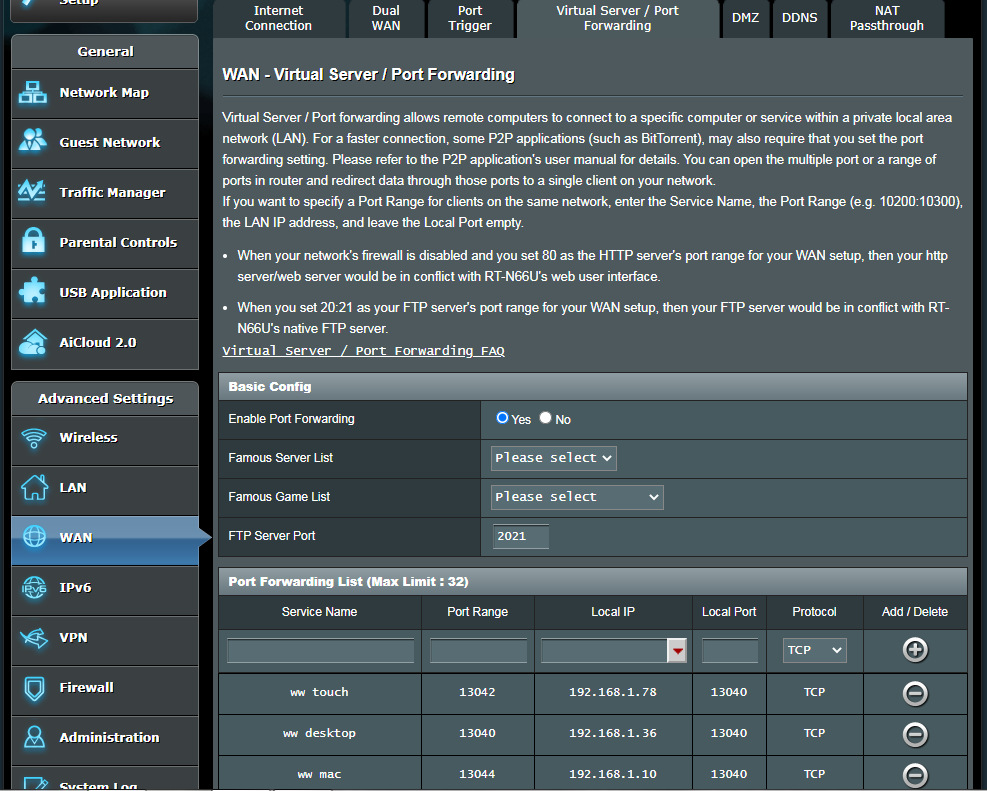
The
Service Name is whatever you want it to be. The Port Range is the
secret code number you pick. Note that each machine has a different
one. The Local IP is the Local Address for one machine. The WildWords Connect box will
show you the Local IP and the Local Port you are ready with. 13040 is
the default Port Number for a WildWords connection. It can be changed.
BTW, it is only the Host
in the Host/Guest relationship that needs to do this. The Host will
provide the Guest with the Wide World address. The connection box above
has a button to find out what that address is.
In addition, the Host provides the Port Range (secret number) for the Guest to specify as the port number.
The WildWords Connection Box is very simple once you know this stuff, and it remembers what you put for another day.
I will be experimenting with other approaches including TAILSCALE which
can provide you with a unique IP outside of your gated community. That also solves the problem of two addresses.
Easy Situations (none of the above is required)
1. Both players are on the same local network. The guest connects using the the host's local ip and local port to connect.
2. One player is not on a local network but connects directly to a Wide World Address. That player should be the host.
3. You just want to practice. No connection at all to the Internet is needed.
Firewalls
Firewalls,
in theory are designed to protect your machine from harmful invasions.
They may also inhibit useful connections like the one needed to play
WildWords. Typically there are options you can choose to allow certain
programs or certain ports to be used freely. Remember that WildWords
will be running as an Oracle program that runs java. Your system may
not see this as something named WildWords. A solution permitting
various ports used by WildWords would be better. WildWords has no way
to communicate anything but the game's status between the two players.
It does not even update itself.
I mentioned TAILSCALE above. This approach and others like it are less
likely to draw interference from firewalls. Even so, the best solution
remains to use Port Forwarding and find a way to slip this program
through restrictions your firewall may be enforcing. As mentioned
before, Google AI sometimes offers decent support for technical issues
about specific situations.
|